← Work / Recharge.com
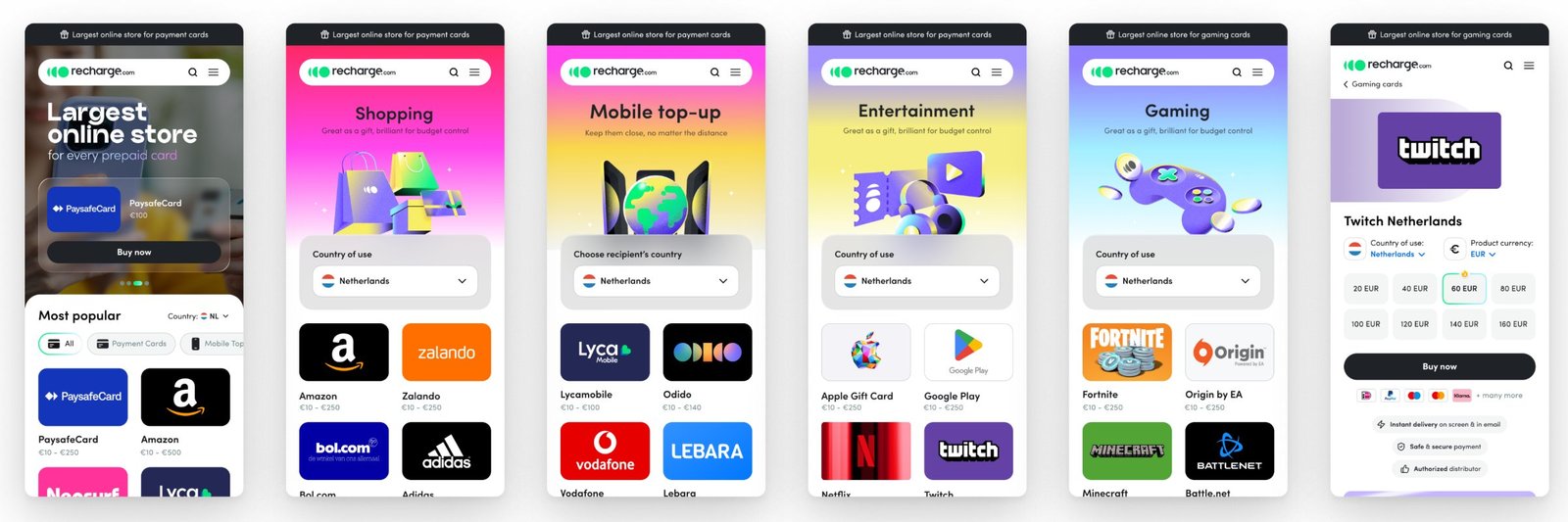
Recharge.com, now part of Coda · Senior → Lead Product Designer · [NEED: years]
One platform for 6 sites and 5 apps
Recharge.com sells prepaid top-up, gift cards and gaming credit in 179 countries. I led design on the full redesign and rebuild: a new design system, the browse and product pages, and checkout — 6 sites and 5 apps moved onto one foundation.
Role
Team
Timeline
Status
33%
conversion lift (+6pp)
6 + 5
sites and apps on one foundation
179
countries
01 — Problem
People arrived ready to buy and left unsure.
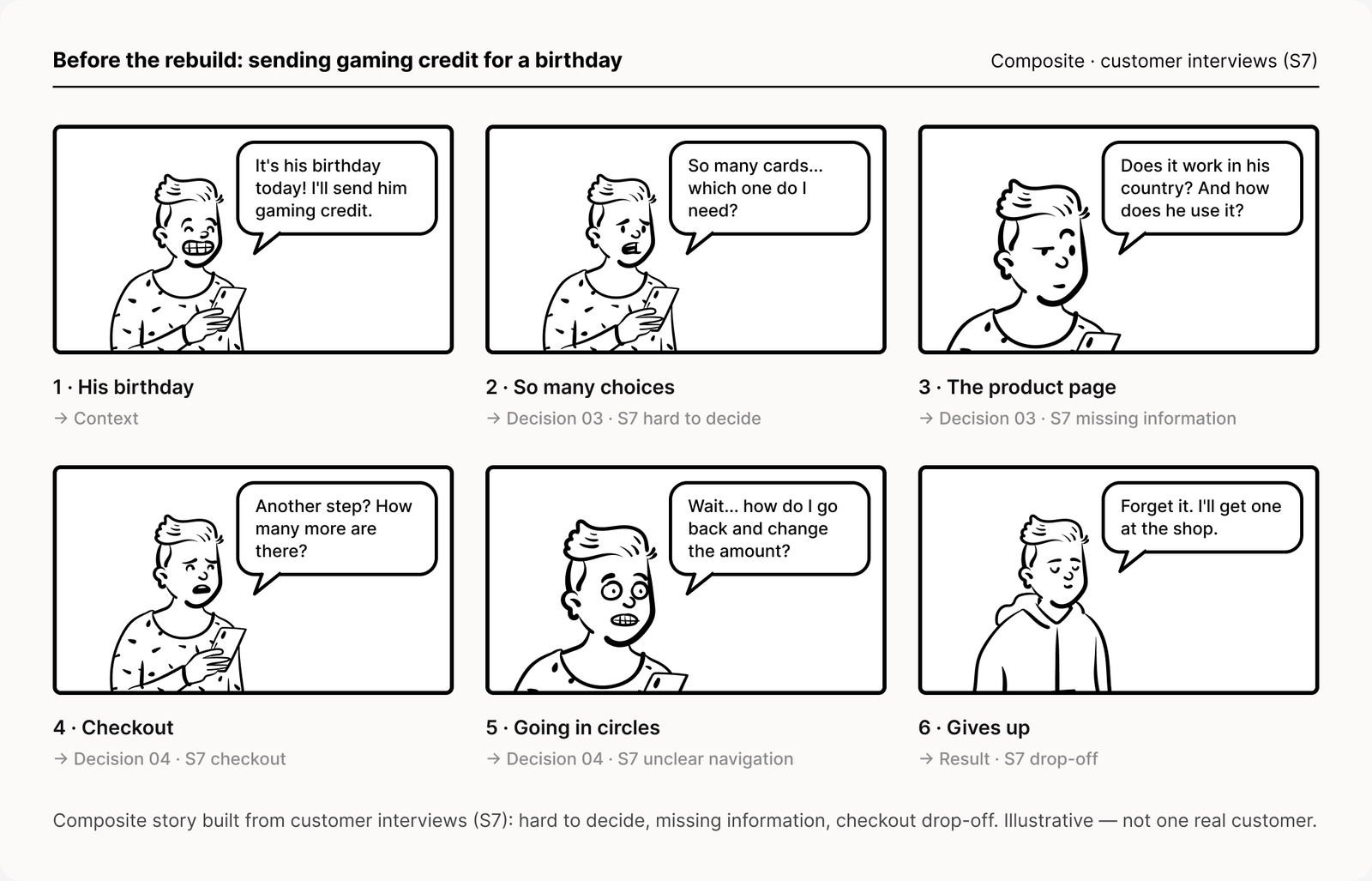
Customer interviews showed three things. The important details weren't prioritised, so choosing was hard. People couldn't find what a product was for, where it worked or how to redeem it. And checkout had too many steps.
The rebuild ran from the interface to the back-end architecture, so brand, flows and components could change together. [CONFIRM: before it, each site and app had its own front end, so every fix shipped several times.]
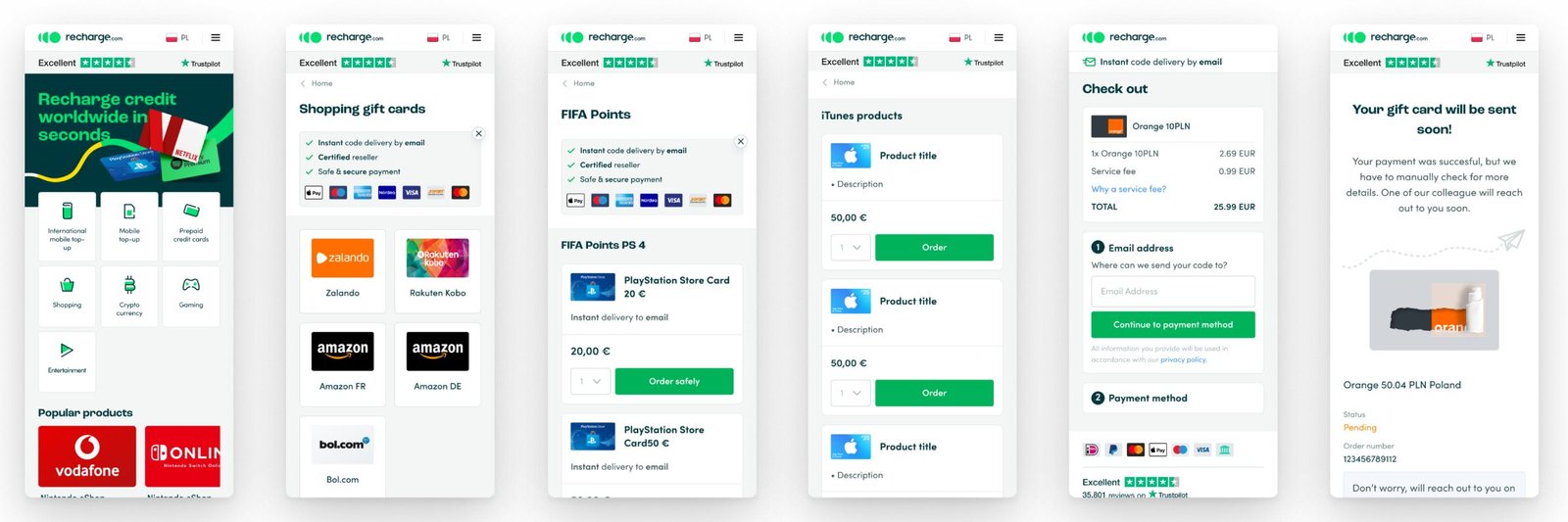
Before and after: the old mobile flow, then the new one on the shared system. Drag to compare.
1. Recruit customers. It took a plan and help from several teams. [NEED: who you interviewed, how many, which markets]
2. Interview for real problems. What people actually struggled with, which often differed from what we expected.
3. Write it up. A research report traced each pain point to its root cause.
4. Iterate. Several design rounds, each refined with feedback. [NEED: how many rounds, with whom]
What it led to: hard to decide → one template with the key details first. Missing information → country of use, FAQs and redemption steps on every product page. Checkout drops → a shorter flow with the fee up front. [CONFIRM mapping]
Three findings. Hard to decide: the important details weren't prioritised. Missing information: people couldn't find what a product was for, where it worked or how to redeem it. Checkout drops: checkout had too many steps.
Signal: [VERIFY: S14 reports +64% task success in moderated usability sessions — needs method and sample]
02 — Decision
A design system first, so a fix ships once.
One set of components for every site and app, each documented with its states, anatomy and when to use it. I own the system.
What I decided not to do
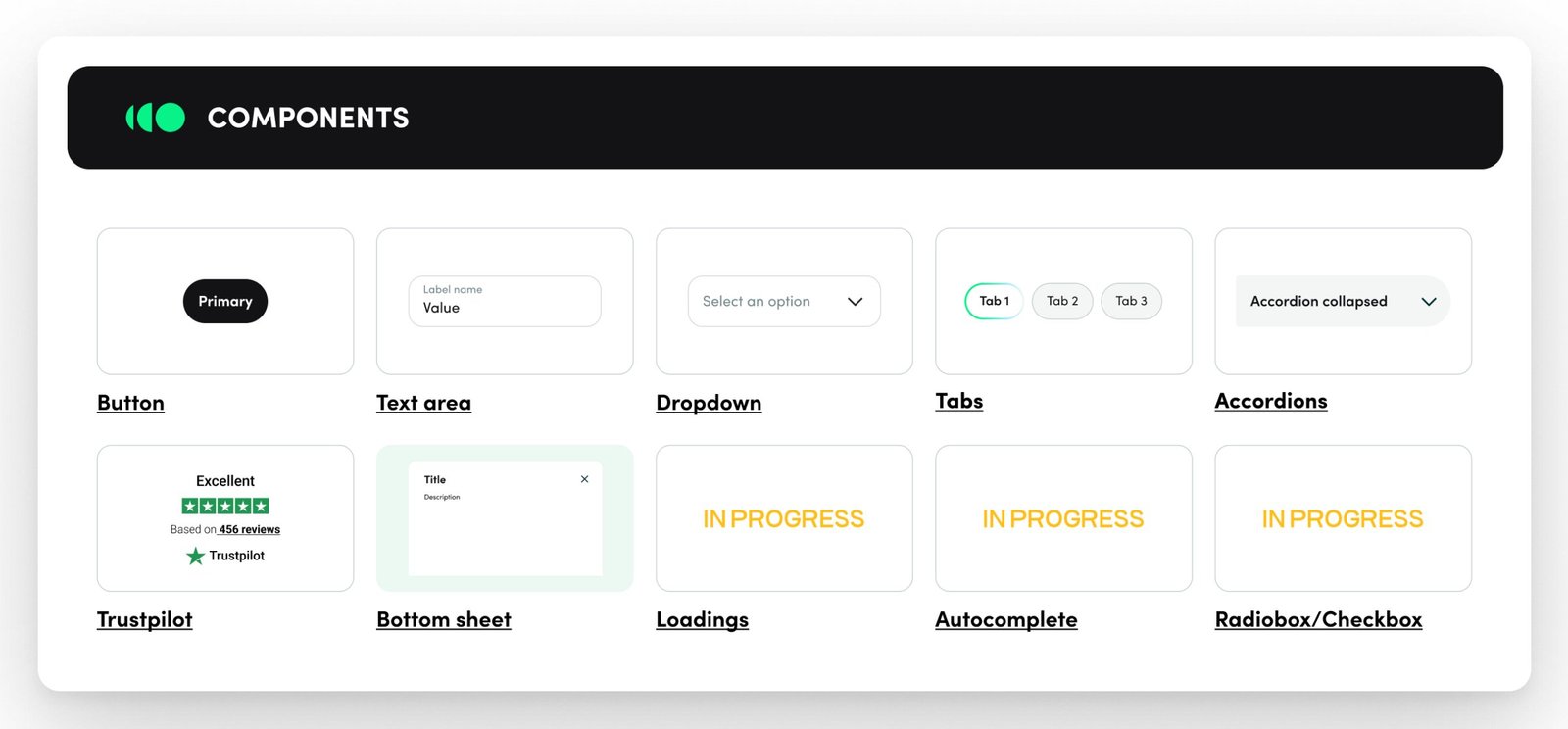
Buttons to bottom sheets: the parts every surface shares.
1. Components that cover commerce. Buttons, text areas, dropdowns, tabs, accordions, tooltips, bottom sheets, loaders, autocomplete, radios and checkboxes.
2. Every state, not just the happy path. The text area alone documents default, filled, active, error, approved and prefilled.
3. Guidance in context. Components show a real use — a birthday input in each state — and when to use them.
4. Specs engineers can read. Layout and spacing per node, and an anatomy that names the token for each part.
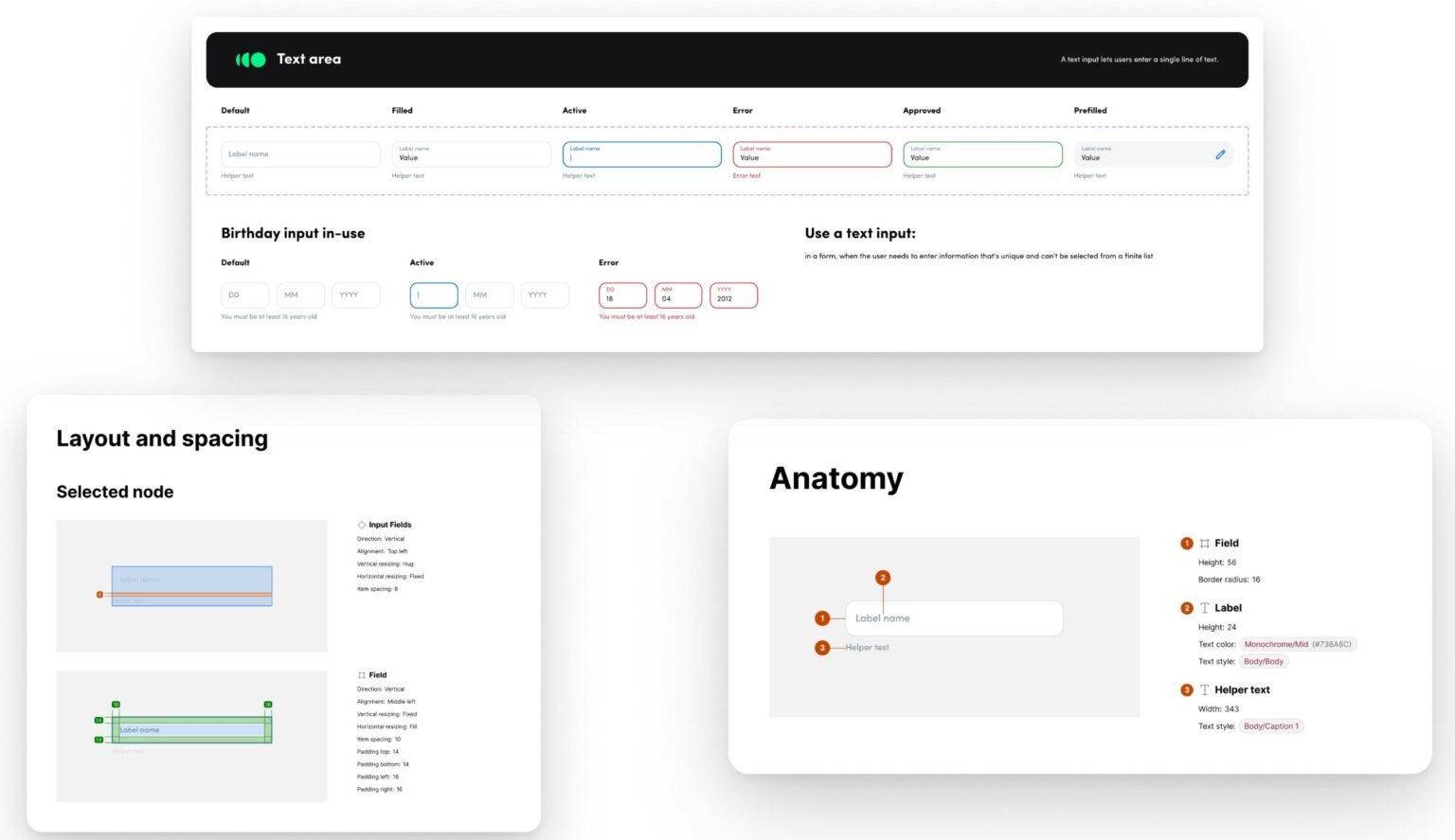
Text area: six states, one anatomy, token names on every part.
Signal: [NEED: adoption — surfaces on the system, contributors, one delivery measure before vs after]
03 — Decision
Every page answers what, where and how before the buy button.
One template carries ~1,000 brands across top-up, shopping, entertainment and gaming. On every product page, where it works sits next to the amounts, and how to redeem sits right below.
What I decided not to do
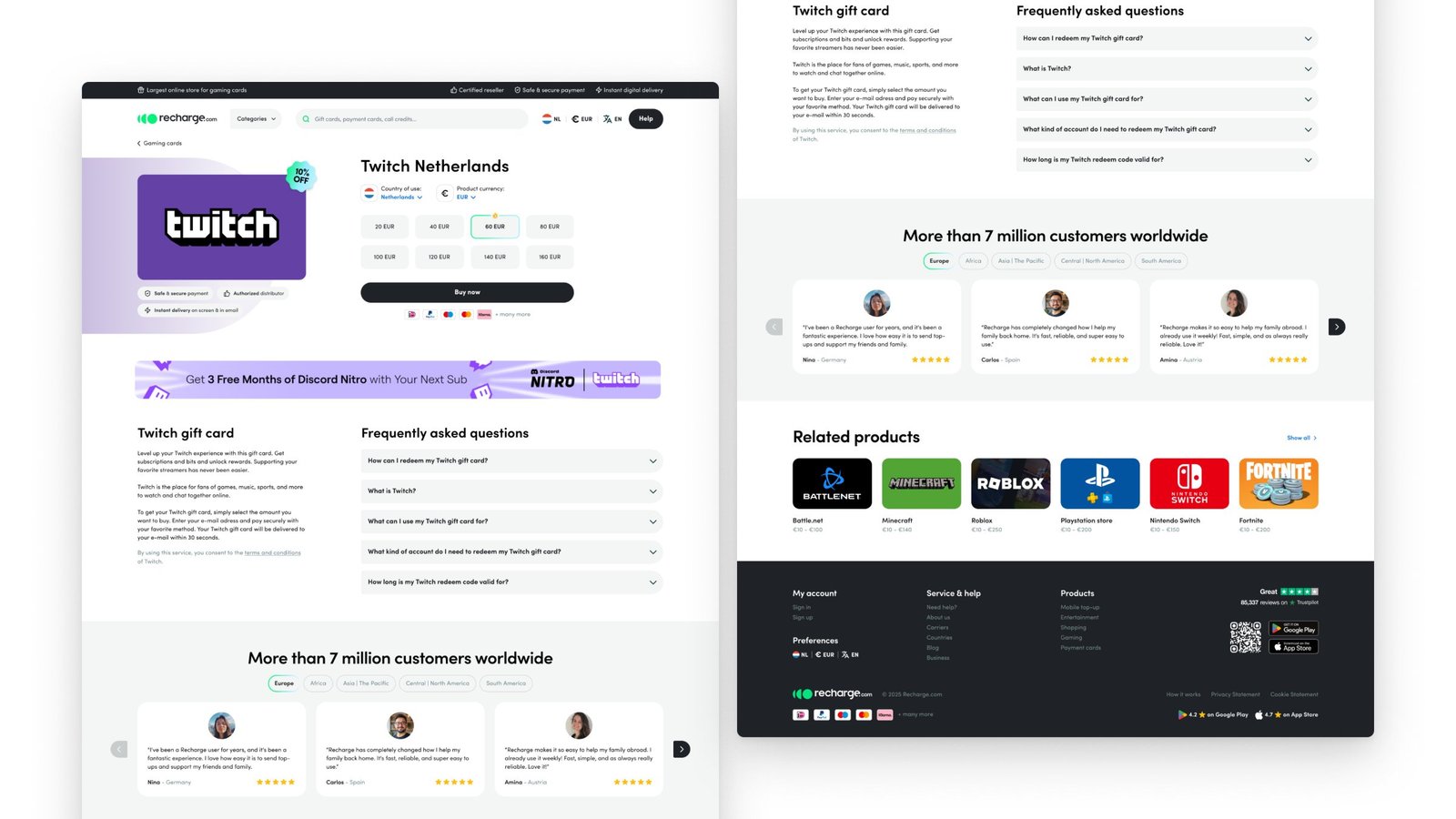
Product page: country of use, amount and delivery promise in one block.
1. One template for every category. Brand grid, reviews and a short explainer; only the art changes.
2. The buy block answers “where”. Country of use and currency next to the amounts, with secure payment, authorised distributor and instant delivery on screen and by email underneath.
3. “How” sits right below. How to redeem, what it's for, whether you need an account, how long a code is valid — on the page, not in a help centre.
4. Proof by region. Reviews filter by region; related products keep people browsing.
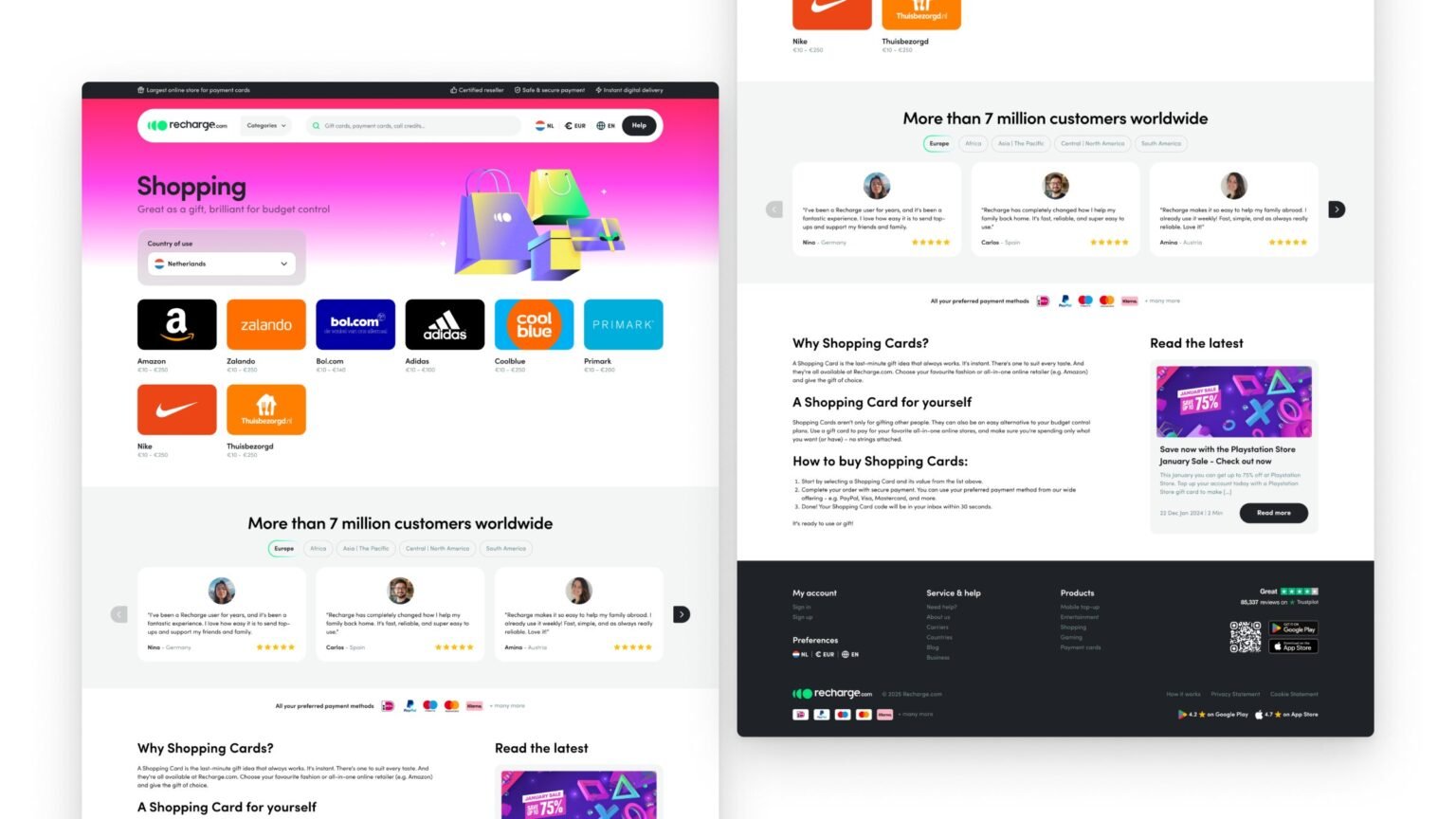
Category page: one template; only the brand art changes.
Signal: [VERIFY: S14 reports +28% first-time user conversion and +22% engagement — needs source, baseline and window]
04 — Decision
Checkout shows the fee up front and ends with the code on screen.
The full price, service fee included, shows before anything is asked. The purchase ends with the code on screen, a copy button and a warning never to share it. [NEED: step count before vs after]
What I decided not to do
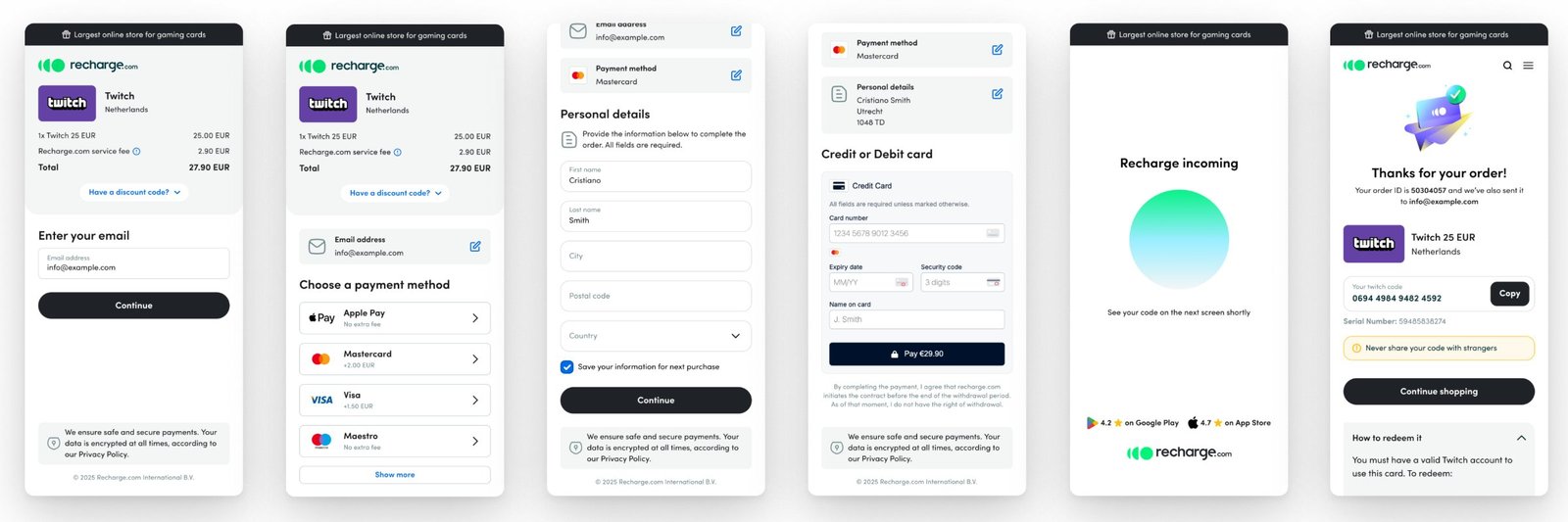
Checkout: the fee before anything is asked; a scam warning at the moment of delivery.
1. The full price first. Item and service fee before anything is asked, with a discount-code link.
2. Email, then payment. Email first [CONFIRM: because the code is delivered there]; then the payment method (Apple Pay, Mastercard, Visa, Maestro), personal details with an option to save them, and the card form.
3. Reassurance on every step. A line on secure, encrypted payment at the bottom of each screen.
4. The code is the confirmation. A short wait, then the code with a copy button, a warning never to share it, how to redeem it, and a copy by email.
What happens when it goes wrong. [NEED: failed payment or wrong-region state — the deck has none]
Signal: [VERIFY: S14 reports +42% checkout completion]
05 — Result
Conversion rose 33% (+6pp).
Checkout and product-page work behind a 33% conversion lift — a team result I led design on. [NEED: baseline, method, time window]
For the team: [NEED: one delivery measure before vs after the system].
[VERIFY: S14 numbers stay off this page until they have a source.]
Recharge was later acquired by Coda. Context, not credit.
06 — Looking back
[NEED: one thing you'd do differently]
One honest line. Something testing or launch proved wrong, and what you'd change.
07 — Experiments
[NEED: what testing taught us, in one line]
[NEED: one or two sentences — how experiments ran on this project, and who ran them]
01 Winner [NEED: surface]
Experiment: [NEED: what changed]
[NEED: primary metric]
[NEED: ±0.0]
Hypothesis
[NEED: If we …, then … will …, because …]
Insights
[NEED: metric ±0.00%]
[NEED: metric ±0.00%]
Learnings
[NEED: what the numbers taught you]
Takeaway / next steps
[NEED: ship, don't ship or iterate — and what you test next]
Test setup · [NEED: split · duration · sample size · significance]

02 Rejected [NEED: surface]
Experiment: [NEED: what changed]
[NEED: primary metric]
[NEED: ±0.0]
Hypothesis
[NEED: If we …, then … will …, because …]
Insights
[NEED: metric ±0.00%]
[NEED: metric ±0.00%]
Learnings
[NEED: what the numbers taught you]
Takeaway / next steps
[NEED: ship, don't ship or iterate — and what you test next]
Test setup · [NEED: split · duration · sample size · significance]
Credits
Design: Ditbardh Uka (lead), [NEED: names]. Product: [NEED]. Engineering: [NEED].
Next case study
Four internal tools, one admin →
© 2026 Ditbardh Uka · Amsterdam